

Product·· 10 min read

Your AI Assistant Can Finally Do the Admin — Meet the OEASE MCP Server

AI has been great at writing about your organization and useless at working inside it. Today that changes: connect Claude, ChatGPT, Cursor, or any MCP-capable assistant to OEASE and let it check dues, run events, close the books, and draft announcements — with your permissions, never more.
Share
Your AI Assistant Can Finally Do the Admin — Meet the OEASE MCP Server

It's 10:40 on a Tuesday night. You're the treasurer — or the president, or the one officer who "is good with computers" — and you have four tabs open. The dues list. Saturday's ticket orders. The spreadsheet where somebody was tracking who's on the volunteer team. And a chat window with an AI assistant, into which you are pasting names.

You paste, it drafts a reminder, you copy the reminder back out. You paste the order list, it summarizes, you re-type the numbers into the board update. It's helpful, the way a very smart friend who isn't allowed to touch anything is helpful.

That's the strange place AI has been for organizations like yours. It can write, reason, summarize, and plan better than most software you've ever paid for. It just can't see your organization, and it can't do anything in it. Most "AI for nonprofits" advice ends up in the same place: copy your data into the chatbot. Which is slow, and error-prone, and — when the data is a member list with names, emails, and payment status — not something you should be pasting anywhere.

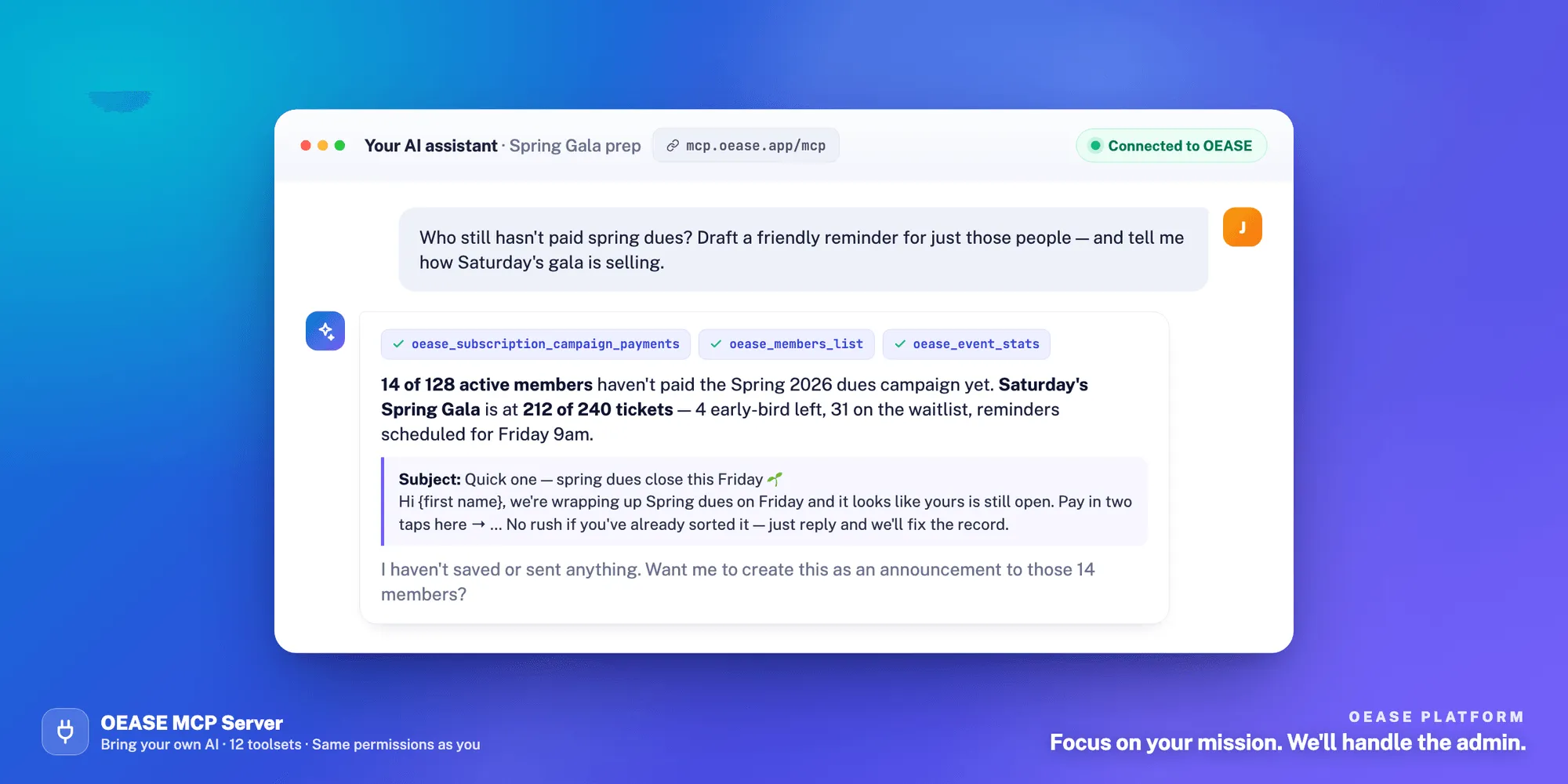
Today that changes. OEASE now has an MCP server. Your AI assistant — Claude, ChatGPT, Cursor, or any app that speaks the Model Context Protocol — can connect directly to your organization and work inside it. Look things up. Take actions. Run the weekly rituals. With exactly the permissions you have, and not one more.

It's live at https://mcp.oease.app/mcp, and like everything else on OEASE, it's free.

What Is an MCP Server? The One-Paragraph Version

MCP is the Model Context Protocol — an open standard, introduced by Anthropic in late 2024 and adopted across the industry since, for connecting AI assistants to tools and data. Think of it as a USB port for AI: instead of every app building a one-off integration with every assistant, an app publishes one MCP server, and any assistant that supports the standard can plug in. The assistant learns what the app can do — "list members," "record an expense," "publish an event" — and performs those actions on your behalf, after you've signed in and approved the connection. OEASE's is a remote MCP server: it runs on our side, at one address, so there is nothing to install or keep updated.

You don't need to understand more than that to use it. If you can paste a link into a settings page, you can connect your assistant to OEASE.

What You Can Actually Ask It to Do

The OEASE MCP server exposes almost everything an admin can do in the app — 197 actions across twelve areas: members, departments and teams, announcements, membership dues campaigns, time polls, bio pages, events, finance, recruitment, roles, admins, and organization settings. In practice, that turns into conversations like these.

Ask the questions you'd normally build a spreadsheet to answer

  • "Who hasn't paid this semester's dues? Group them by department."
  • "How is Saturday's gala selling against capacity, and how many people are on the waitlist?"
  • "What did we spend on food this year, month by month?"
  • "Which applicants have been sitting in Interviewing for more than two weeks?"

Your assistant pulls the real numbers from OEASE and answers in plain language. No export, no pivot table, no pasting.

Hand it the admin you've been putting off

  • "Add these thirty people from the sign-up sheet as pending members and put them all on the Volunteers team."
  • "Create the fall kickoff as a draft event: free general admission, a $15 alumni ticket, and a promo code for last year's officers. Show me before you publish anything."
  • "Record last night's expenses — here's the list — in the Social pocket, categorized as Food."
  • "Tag every member of the Volunteers team as core."

These are the thirty-minute chores that eat a volunteer's evening. They become a sentence.

Draft in your voice, from your data

  • "Draft an announcement to the Events department about the venue change. Preview who it reaches first."
  • "Write the treasurer's report for the board from this month's numbers."

Because the assistant reads the audience and the figures straight from OEASE, the draft is specific instead of generic. It shows you what it wrote and exactly who would receive it — and then it waits.

Or just run the checklist

The server ships with seven built-in workflows — they show up as ready-made prompts in your assistant — for the things every organization does on repeat: a membership health check, an event-readiness review, a recruitment pipeline review, a finance month-close, onboarding a new member into the right department and dues campaign, drafting an announcement, and a weekly digest across everything. Each one knows which numbers to pull and which questions to ask. Each one reads first and asks before it changes anything.

Built for the Part That Worries You

If your first reaction to "an AI can take actions in my organization" is caution — good. Ours was too. Most of the design work went here.

You approve the connection, and you see exactly what it gets. Connecting an assistant runs through OEASE ID, the same sign-in that protects your account. The consent screen tells you what the assistant can do (act in OEASE as you, within your role), what it can't (sign in on the web, change your password, or see your passkeys), and which organizations it will be able to reach. Nothing connects until you click Allow.

It has your permissions — never more. Every single action is checked against your role in that organization, exactly as if you had clicked the button yourself. A finance reviewer's assistant can't open the member list. An events admin's assistant can't read the books. There is no AI superuser, and no way to talk an assistant past a permission it doesn't have — a denied action is explained to it, so it stops rather than trying again. This is also the honest caveat: the assistant can do what you can do. If you'd rather it couldn't remove members, connect it from an account whose role can't.

It sees curated summaries, not the database. Tools return the information the equivalent admin screen shows, and sometimes less. Private notes, raw payment identifiers, check-in secrets, and the like never leave OEASE.

Everything is logged. Every action an assistant takes — and every action it was denied — is written to an audit trail: who, which organization, which tool, what happened. If an assistant ever starts behaving strangely, that's where you'd see it first.

Disconnect in one tap. Every connected assistant is listed under Security in your account, right next to your signed-in devices. Remove one and its access ends immediately.

Plug in only what you need. You don't have to hand an assistant all twelve areas. Add ?toolsets=members,events to the connection URL and it sees only those — which also makes it sharper, because an assistant choosing from twenty tools makes better decisions than one choosing from two hundred.

How to Connect

You'll need an OEASE account that administers at least one organization, and an AI app that supports remote MCP servers. Then:

Claude — in claude.ai or the desktop app, open Settings → Connectors, choose Add custom connector, and paste https://mcp.oease.app/mcp. Sign in with OEASE ID when prompted, review the consent screen, and click Allow. Custom connectors are available on every Claude plan, including Free.

Claude Code — one line in your terminal, then /mcp to sign in through the browser it opens:

claude mcp add --transport http oease https://mcp.oease.app/mcp

ChatGPT — turn on Developer mode in Settings (available on the paid plans, on the web), then add https://mcp.oease.app/mcp as a new server. ChatGPT asks you to confirm each change before it's made.

Cursor, and everything else — wherever the app lets you add a remote MCP server by URL, use the same address. The sign-in flow is identical.

To narrow what it sees, add the areas you want to the URL — for example https://mcp.oease.app/mcp?toolsets=members,events. The available names are members, departments, announcements, subscriptions, timepolls, bio, events, finance, recruitment, roles, admins, and org-settings.

Once it's connected, a good first message is "Which organizations can you see?" Your assistant will list the ones you administer, and you're off.

For the Officer Who Codes

If you're the one who has already written a script or two, the same server works from Claude Code, Cursor, or anything built on an MCP SDK. The scripts that used to scrape a CSV export can ask OEASE directly. A weekly digest can run itself on a schedule. A check-in dashboard for Saturday can be built in an afternoon. The tool names are descriptive (oease_members_list, oease_event_stats, oease_finance_record_expense), the outputs are structured, and the error messages are written to be read by a model, so it self-corrects instead of guessing.

Under the hood it's a standards-only server: the current MCP specification (the 2026-07-28 revision) over Streamable HTTP, OAuth 2.1 with PKCE, and both client-ID metadata documents and dynamic registration for sign-in — so it works with today's clients and tomorrow's without a special build for either.

Still Free. Same Reason.

The MCP server costs nothing, because OEASE costs nothing. No AI add-on tier, no per-seat pricing, no cap on how much your assistant can do. We sustain the platform through a small fee on payments that move through it — dues, tickets, donations — and an AI connection doesn't move money, so there is nothing to charge for.

You bring the AI. Some assistants have their own subscriptions, and that's between you and them. OEASE's side of the connection is free and stays that way.

Questions We Expect

Do I need to know how to code? No. Connecting is pasting a link and clicking Allow. The command-line route exists for people who want it.

Can the assistant do something I can't? No. It acts as you, limited to your role in each organization. It also can't sign in to the website, change your password, or touch your passkeys.

Will it send emails or announcements on its own? Every built-in workflow reads first and asks before changing anything, and the drafting workflow never sends. But your assistant can publish or send if you tell it to and your role allows it — so read what it proposes before you say yes, the same way you'd read before hitting Send yourself.

Which AI apps work? Any that support remote MCP servers with sign-in — Claude (web, desktop, and Claude Code), ChatGPT, Cursor, and a growing list of others. If yours isn't there yet, it likely will be; that's the point of an open standard.

Can I turn it off? Any time, from Security in your account. Access ends the moment you disconnect.

Why We Built It This Way

We could have added a chat box to the OEASE dashboard and called it "AI." A lot of software did. Most AI features in this space are exactly that — a chat box inside one product, or a read-only export to one vendor's assistant, often behind a paid tier.

But you already have an assistant you like — one that knows how you write and lives on your phone. The last thing a volunteer treasurer needs is a second, dumber one that lives in a specific tab. What you need is for the one you already use to be able to reach your organization: safely, with your permissions, able to do things and not just read them, and without you playing copy-paste courier between two windows at 10:40 on a Tuesday.

That's what an open standard makes possible. OEASE speaks it now, and so will whatever assistant you're using next year.

The admin was never the point. It was the tax on the work that is. Go connect your assistant, ask it who hasn't paid, and spend the rest of the evening on something else.

Connect your assistant: mcp.oease.app/mcp · Open OEASE at oease.app

Stuck, or built something with it we should see? Write to [email protected] or find us on Discord — a person answers.

Found this useful? Pass it to another leader who needs it.

Share

Keep reading

Recruiting Season Shouldn't Live in a Google Form and a Group Chat
Product

Recruiting Season Shouldn't Live in a Google Form and a Group Chat

Applications in a form, résumés in a folder, interviews in eleven text threads, decisions in a chat that scrolls away. We shipped the Recruitment module to end all of it — free, with your own careers page at oes.careers.

Your Events Deserve Better Than Eventbrite and a Google Form
Product

Your Events Deserve Better Than Eventbrite and a Google Form

Tickets on one platform, RSVPs on another, a printed list at the door, and Venmo to reconcile afterward. There's a better way to run your organization's events — and it's free.
Your Link-in-Bio Should Belong to Your Organization, Not a Third Party
Product

Your Link-in-Bio Should Belong to Your Organization, Not a Third Party

Most clubs and nonprofits rely on Linktree, Beacons, or a Notion page to share their important links. Here's why that's a hidden cost — and how OEASE Bio Pages give every organization a free, branded link-in-bio that actually belongs to them.

Run your whole organization for free.

Members, dues, events, finances, scheduling — one platform, no subscriptions, no per-seat fees. Built for clubs, nonprofits, and communities.